Youth
from $199/ year
One team or a small youth program.
- 1 team, 2 coaches, 12 players
- 9 plays
- Up to $299: more plays, priority support, onboarding
Basketball-specific teaching logic turns your play into interactive learning players explore from their own position. Quizzes show what they understand, and your report shows where it breaks down, so the next practice goes straight to the gap.
Plays can be understood from a whiteboard, a bird's-eye view, or a specific position's point of view.
Drag to rotate the court, pinch or scroll to zoom, tap a number to see through that player's eyes.
Why ChalkTalk
The whiteboard, the walkthrough, film study, reps and position-by-position teaching work. They're how the game has always been passed on, and they still are.
What they can't do is follow the player home, or tell a coach who understood the read and who only memorized the movement. ChalkTalk extends the teaching you already do: players revisit your play from their own position, show what they understand in a quiz, and your report shows where understanding breaks down so the next practice can go straight to it.
What already works
What ChalkTalk adds
Built by a coach with 20+ years on the sideline, who also founded Hoops Creating Hope, which uses basketball to teach young people in India. Teaching the game is the point.
The problem
Every coach has a system. Getting it out of the coach's head and into all of your players' heads, understanding the concepts the same way, is the hard part.
PDFs, whiteboard photos, screenshots and group-chat explanations. Each one shows a frame, not the sequence, the reads or the counters.
A drawing can't show timing: when to cut, when the screen is set, where the defense will be. That's exactly what players get wrong.
Practice time is limited, so it's hard to know who understood the read and who only memorized the spots, until it shows up in a game.
How it works
Real screens from ChalkTalk. The report uses sample data.
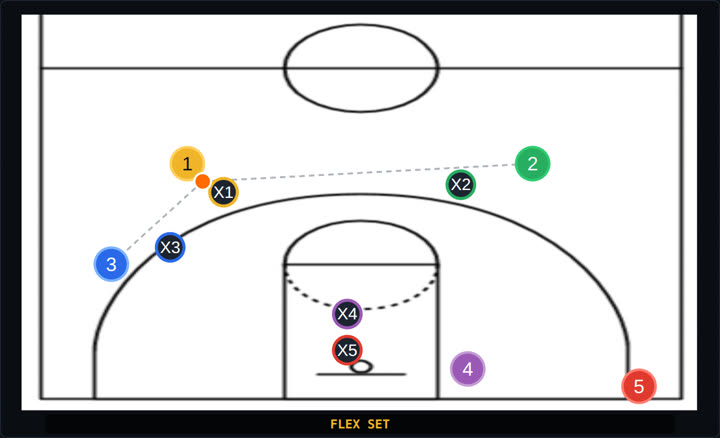
Type or talk through the play the way you'd explain it at a timeout. ChalkTalk builds it phase by phase, with roles, timing, reads and the defense's reactions, and you review it before anyone sees it.
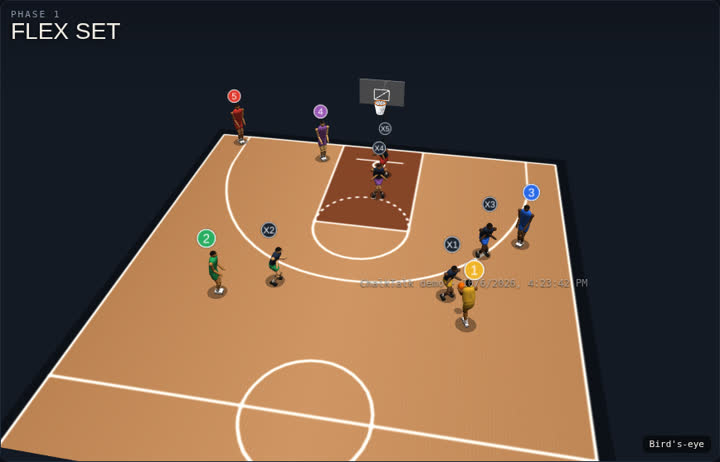
Players see the play as a diagram, in motion, and in 3D through their own eyes, with the defense they'll face. Every position gets its own job, in your words.
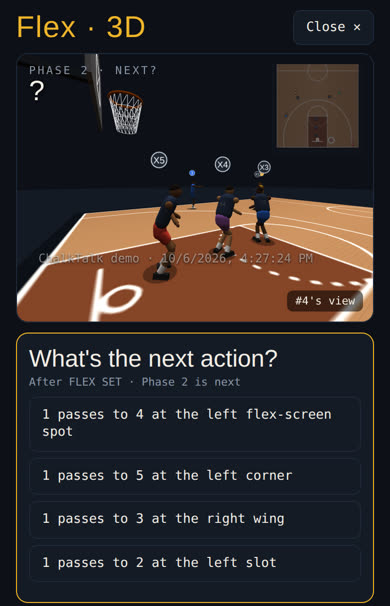
"What happens next?" on offense and defense, and for high school and up, reading the defender on and off the ball: shoulder, feet, where he's sending you, denying or sagging. Tap the court to answer, in 3D or on the diagram. Each answer comes with the why.
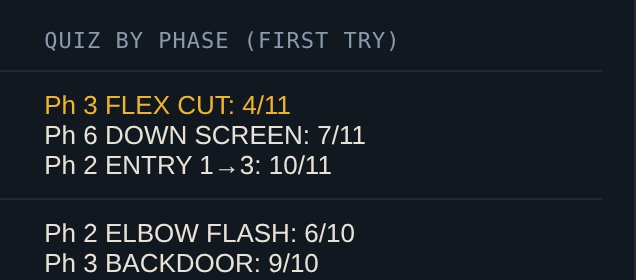
Your report shows each play's quiz results phase by phase, first try, with weak phases flagged, plus each player's scores and who hasn't opened the play. Opening a play isn't the same as understanding it, and the report shows the difference.
You decide what to reteach: one phase, one read, one group of players, instead of running the whole play again for everyone. Players revisit it and retake the quiz. The next result shapes your next practice.
The learning spiral
Most tools end when the player finishes the activity. ChalkTalk's loop keeps going: the report sends you back to teaching, aimed at the specific gap, and the next check tells you whether it closed.
A continuous cycle of instruction, comprehension, and targeted improvement.
Translate basketball concepts into interactive learning.
Let players revisit concepts and demonstrate understanding.
Give coaches reports identifying where comprehension breaks down.
Focus instruction, revisit the concept, and test again.
Every learning cycle informs the next teaching decision.
Where the time goes
ChalkTalk is designed to help coaches focus teaching time where it matters most: players arrive having seen the play, and you arrive knowing which part to work on.
| Approach | Before practice | During practice | Between practices | After a check |
|---|---|---|---|---|
| Whiteboard and walkthrough | Players arrive new to the play. | Coach explains it, team walks through it, re-explains for whoever missed it. | A photo of the whiteboard, if anything. | Gaps show up in scrimmage or games; the next practice re-teaches the whole play. |
| With ChalkTalk | Players study the play, their position and the defense on their phones. | Walkthrough and reps go faster, with more time on execution and decisions. | Players revisit it and take the quiz. | The report shows the weak phase; the next practice targets it, then players check again. |
For coaches
Real court geometry for high school and college, players coded 1 to 5, and defense that follows real rules: on-ball between the man and the basket, help in the middle of the lane, deny on the basket side, screens set on the right defender. Players learn the right habits from day one.
For programs
Varsity, JV and freshman, or every squad in a club, learning the same system, while each coach can still adapt it for their team.
See ChalkTalk In Action
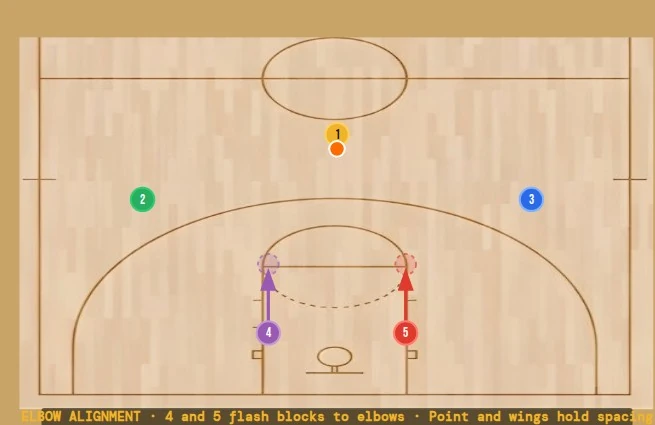
Half-Court
Bigs flash to the elbows to force early defensive declarations — a 3-phase half-court entry system running live in beta.
Explore Play →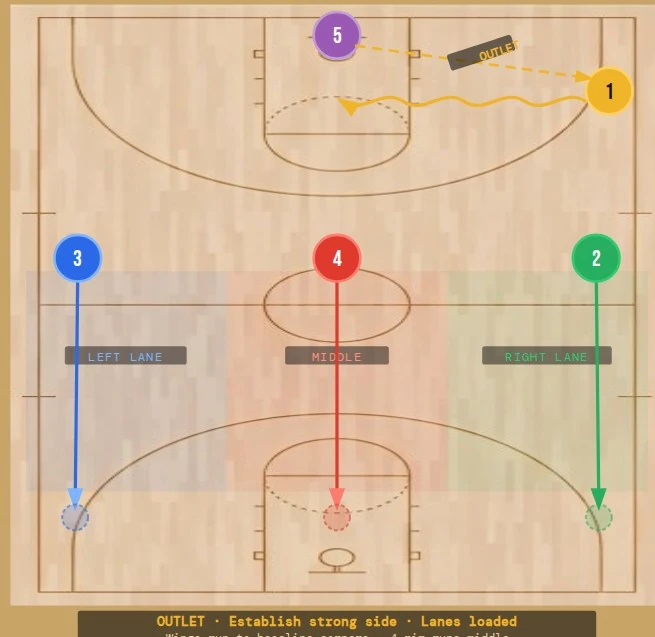
Full-Court
An 8-phase system connecting the outlet and lane fill straight into a half-court set — built for a coach who runs both.
Part of the private playbook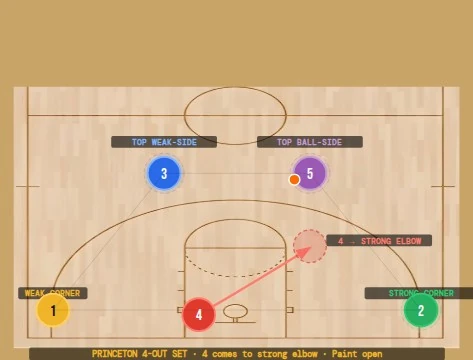
Clear Learning Per Position
One public phase from a private playbook — see exactly what a coach, player, or parent opens on their phone.
See Sample Play →In the beta
Youth, high school, club and college programs are using ChalkTalk in our beta. They are beta participants, not paying customers.
As of October 1, 2026. Player logins count sign-ins, not unique players.
Pricing
Every plan includes the whole learning loop: interactive plays, 3D, defense, quizzes and the coach report. Plans differ by size and support. Free beta sign-ups for basketball close January 15, 2027. Beta programs pay nothing until April 15, 2027.
from $199/ year
One team or a small youth program.
from $499/ year
Varsity, JV and freshman running one system.
from $1,000/ year
Organizations with many squads.
from $5,000/ year
Staff, players and a scout team.
Starting prices are what you pay at checkout. The higher end of each range adds more plays (youth), priority support and onboarding; we'll quote it on request. Teams inside a program (shared or team-only plays) are included. Bigger program? Talk to us.
Roadmap
Beta
We're adding a small number of basketball programs to the free beta this season. Sign up by January 15, 2027 and the full product is free until April 15, 2027. Apply and we'll be in touch.